Loading...
Back to Blog
Back to Blog Dan Malone
Every Monday I Type /mission — 9 Claude Code Skills That Run My Business
Dan MaloneMarch 24, 2026
12 min read
View Source Code
github.com/Danm72
Connect on LinkedIn
linkedin.com/in/d-malone
Follow on Twitter/X
x.com/danmalone_mawla
Share this article
TL;DR
I built 9 Claude Code skills — folders of markdown files — to keep my one-person portfolio business oriented around goals, KPIs, and the actions that actually move them. Every Monday I type
/mission and get a strategic scorecard that ranks my tasks by real impact, flags busywork, and tells me if I'm sharpening the spear instead of hunting the mammoth. Here's the full system.Every Monday I Type /mission — 9 Claude Code Skills That Run My Business
Every Monday I type /mission and my terminal shows me which of my tasks actually move the needle — and which ones just feel productive.
I have ADHD, I run a portfolio business with about 3 clients at any time, and on a good day I get maybe 2 hours of real focused work. That's not self-pity — it's a constraint I've learned to design around. I don't need more hours. I need the hours I have pointed at the right things.
The problem is figuring out what "the right things" actually are. Not in some abstract annual review way. On Monday morning. Right now. Which task, out of these 40, should I sit down and do first?
That's what Goaly does.
The Gap Between Goals and Monday Morning
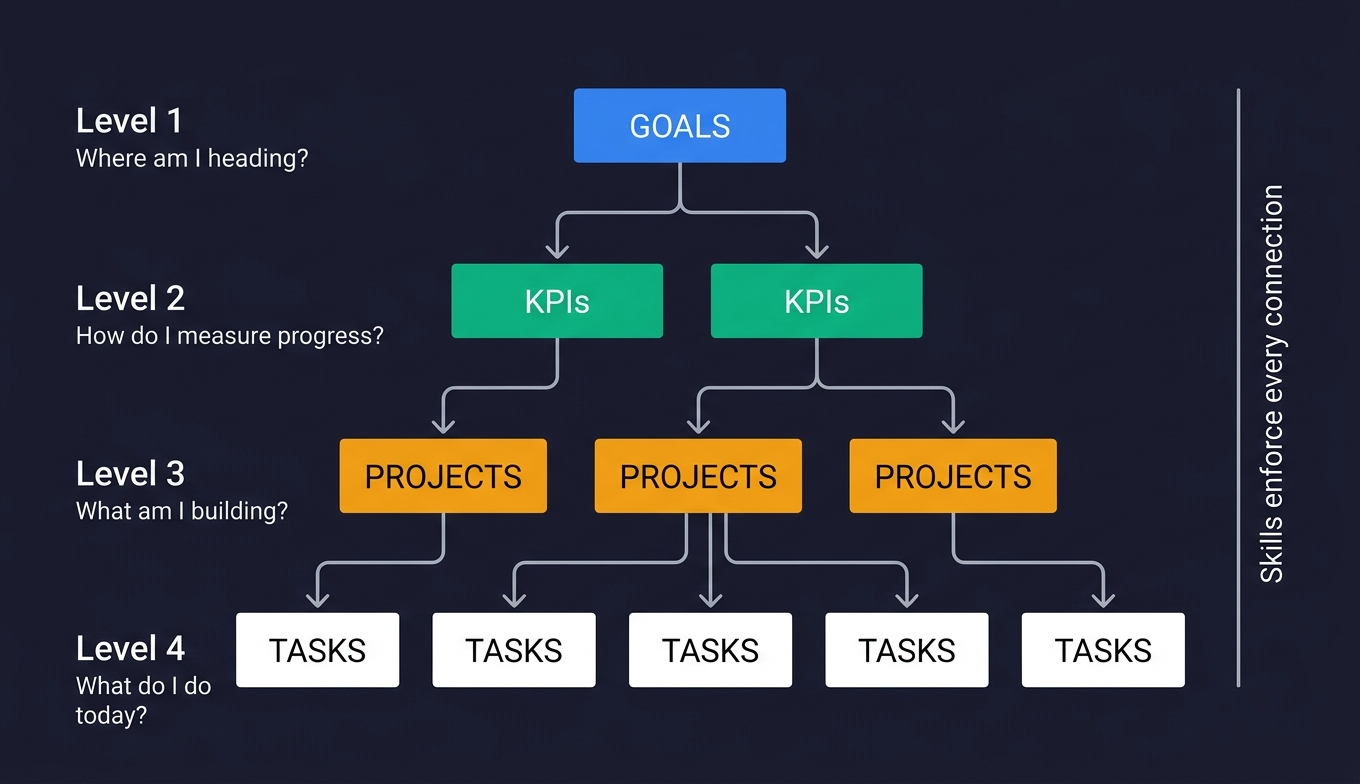
Here's the thing — I'm not short on goals. I have Notion databases full of them. Goals with KPIs. KPIs with targets. Projects linked to goals. Tasks linked to projects. The whole hierarchy.
The gap isn't strategy. It's execution orientation.
Every task feels important when you're staring at it. Reorganise the client folder. Update the README. Tweak that automation. Each one gives you the little dopamine hit of ticking something off. If you have ADHD, you know the feeling — the satisfaction of completion masks the fact that nothing measurable actually moved.
I'd finish a week having shipped 8 tasks and still have zero KPI movement. I was busy. I was not productive. And I couldn't tell the difference until it was too late.
The reality is: a Notion database doesn't care what you do on Monday morning. It just sits there. I needed something that would look at my goals, look at my tasks, and tell me — directly, with numbers — which ones actually matter this week.
The System
9
custom skills
3
phase execution pattern
9
databases synced as local markdown
4
handoff chains between skills
Each skill is a folder of markdown files. The main file — SKILL.md — contains the instructions, steps, and behavioral rules. Alongside it: gotchas.md for failure modes learned the hard way, references/ for scoring criteria and formulas, templates/ for output formats. They share conventions through a _shared/ directory that handles things like data integrity rules, formatting standards, and commit procedures.
The key architectural choices:
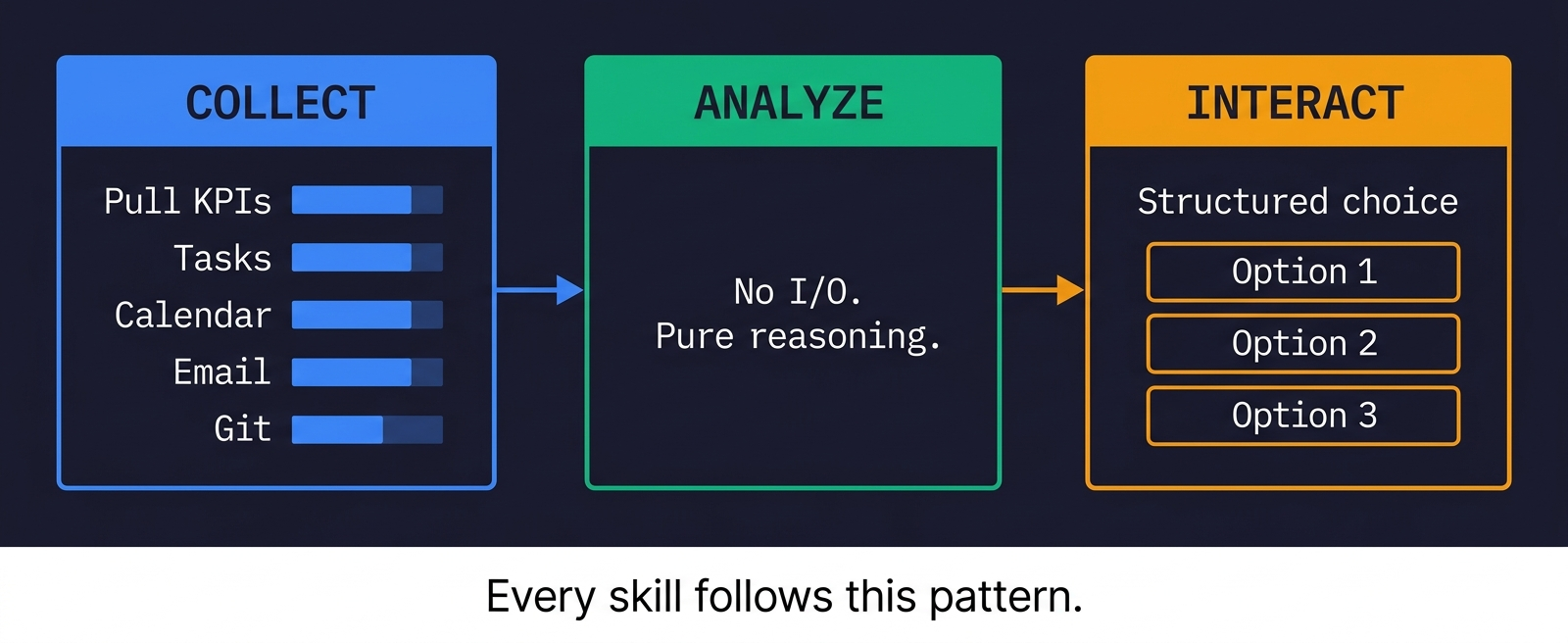
Three-phase execution. Every skill follows the same pattern: collect all data in parallel (calendar, email, tasks, KPIs, git activity), then analyze without any further I/O, then interact with me. This isn't just efficient — it means the analysis step has everything it needs and doesn't get distracted by new data mid-thought.
Local-first. All 9 Notion databases are mirrored as local markdown files. Meeting transcripts from Granola, email threads from Gmail — all synced locally. A semantic search tool called qmd indexes everything. The skills search local mirrors first. They only hit live APIs when the local data is stale or missing.
ADHD-aware formatting. Tables, not prose. Structured choices with 2-4 options, never open-ended questions. Traffic-light indicators. The skills know Dan has ADHD and format everything accordingly.
/mission — The Star of the Show
This is the one that changed how I think about my week.
Every Monday morning I type /mission. The skill detects it's Monday and enters full planning mode. Here's what happens:
Step 1: Parallel data collection. Three groups fire simultaneously. Group A runs semantic searches across my local knowledge base. Group B greps Notion mirror files for active KPIs, client statuses, task states, and per-client interaction history — plus a Gmail search per client to catch unlogged contact. Group C pulls calendar events, recent emails, and git logs across all my repos.
Step 2: Strategic scorecard. KPIs come first. Always. A traffic-light table shows every active KPI with current value, target, progress percentage, and gap. Green if 75%+ of target, yellow for 25-74%, red below 25%. Staleness detection flags any KPI not updated within its tracking frequency.
MRR is the standing question every Monday. The skill computes an estimate from my active client data, then asks me to confirm. It never just assumes — hourly rates times arbitrary hours is misleading, and the skill knows that.
Step 3: Pattern detection. This is where it gets interesting. The skill runs five checks on the collected data:
| Check | What It Catches |
|---|---|
| Portfolio Concentration | Any client > 50% MRR, or fewer than 3 revenue sources |
| KPI Staleness | KPIs overdue for update based on tracking frequency |
| Initiation Avoidance | Active tasks untouched for 14+ days |
| Killed Mammoth | Clients with no interaction for 14+ days, or accepted leads with no follow-up |
| Frog Tasks | Planned or not-started tasks sitting untouched for weeks |
Step 4: Energy budget. How many remaining weekdays. How many are meeting days. How many deep work slots I actually have (free days times 2 blocks). How many are already committed. "Room for 2 more deep work tasks" or "Overcommitted by 1."
Step 5: Last week retro. What shipped (from task completions and git commits). What was planned but never touched. Then the meta-KPIs:
| Meta-KPI | Formula | Target |
|---|---|---|
| Execution Score | Shipped / (Shipped + Wasted) | > 70% |
| High-Leverage Ratio | Needle movers shipped / Total shipped | > 40% |
| Deep Work Ratio | Deep work tasks shipped / Total shipped | > 50% |
The Spear Sharpening Check
This is the thing I'm most proud of.
After computing meta-KPIs, the skill checks whether any active KPI actually changed value in the past week. If I shipped 3 or more tasks but zero KPIs moved, it flags:
You're sharpening the spear instead of hunting the mammoth. Lots of activity (N tasks shipped) but no KPI movement. Are you doing adjacent work that feels productive but doesn't advance anything measurable?
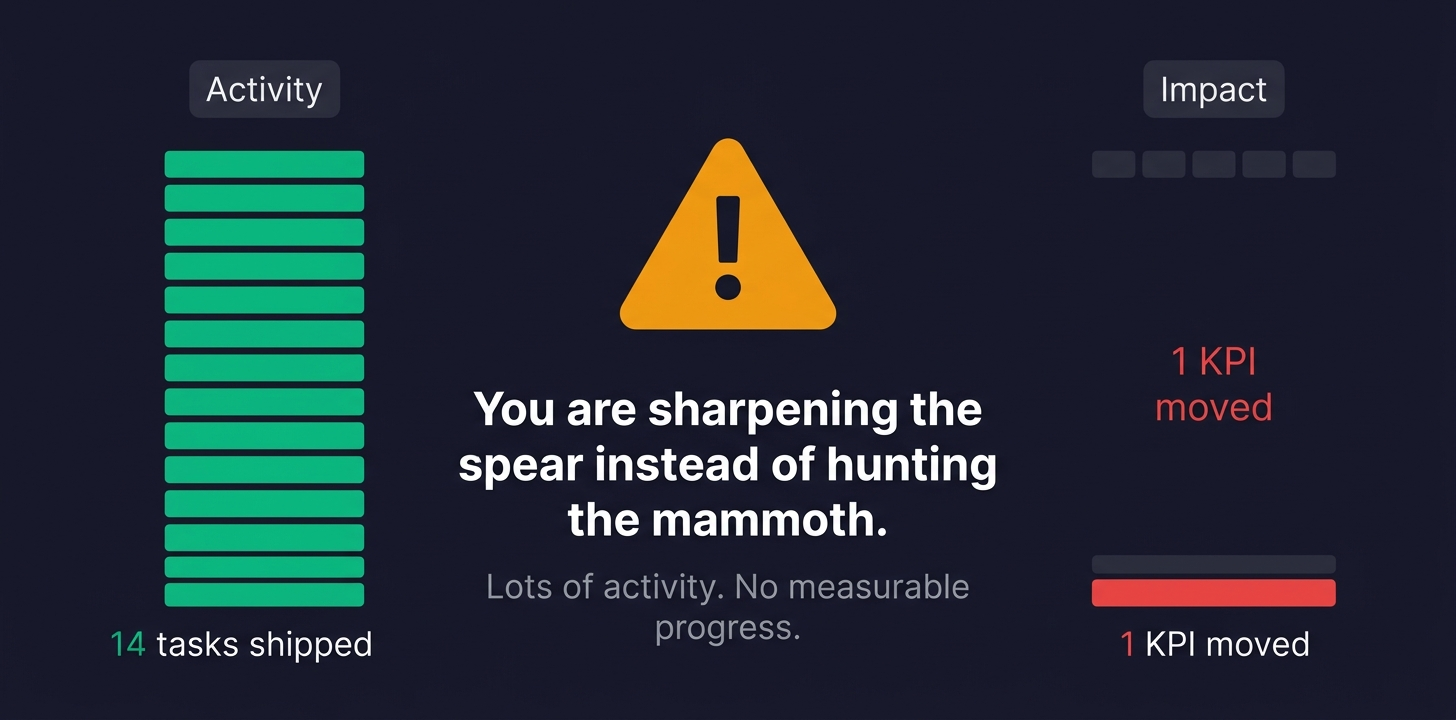
This catches the exact trap I described earlier. The supporting tasks. The maintenance work. The "I'll just clean this up" tasks that feel satisfying but don't connect to any goal. Common triggers: all shipped tasks are tagged impact: Supporting or impact: Maintenance, or they have no Goal/KPI link at all.
It has genuinely changed how I think about my week. Now when I'm about to start a task, there's a voice in my head asking: "Does this move a KPI, or are you sharpening the spear?"
Step 6: Task ranking. Every candidate task gets scored:
| Criteria | Points |
|---|---|
| Moves MRR (client work, revenue-generating) | +3 |
| Ships product toward paying users | +3 |
| Grows audience/subscribers | +2 |
| Has a hard deadline | +1 |
| Someone external is waiting | +1 |
Pulse Mode
On weekdays, /mission runs in pulse mode. Just the scorecard, any flags, and today's tasks. 2-3 minutes. Zero interaction unless something is critically stale. It's the quick "am I still on track?" check.
The Dashboard
The terminal is where the conversation happens. But scrolling past 10 tables to remember what your KPIs looked like while you're picking tasks? Not great.
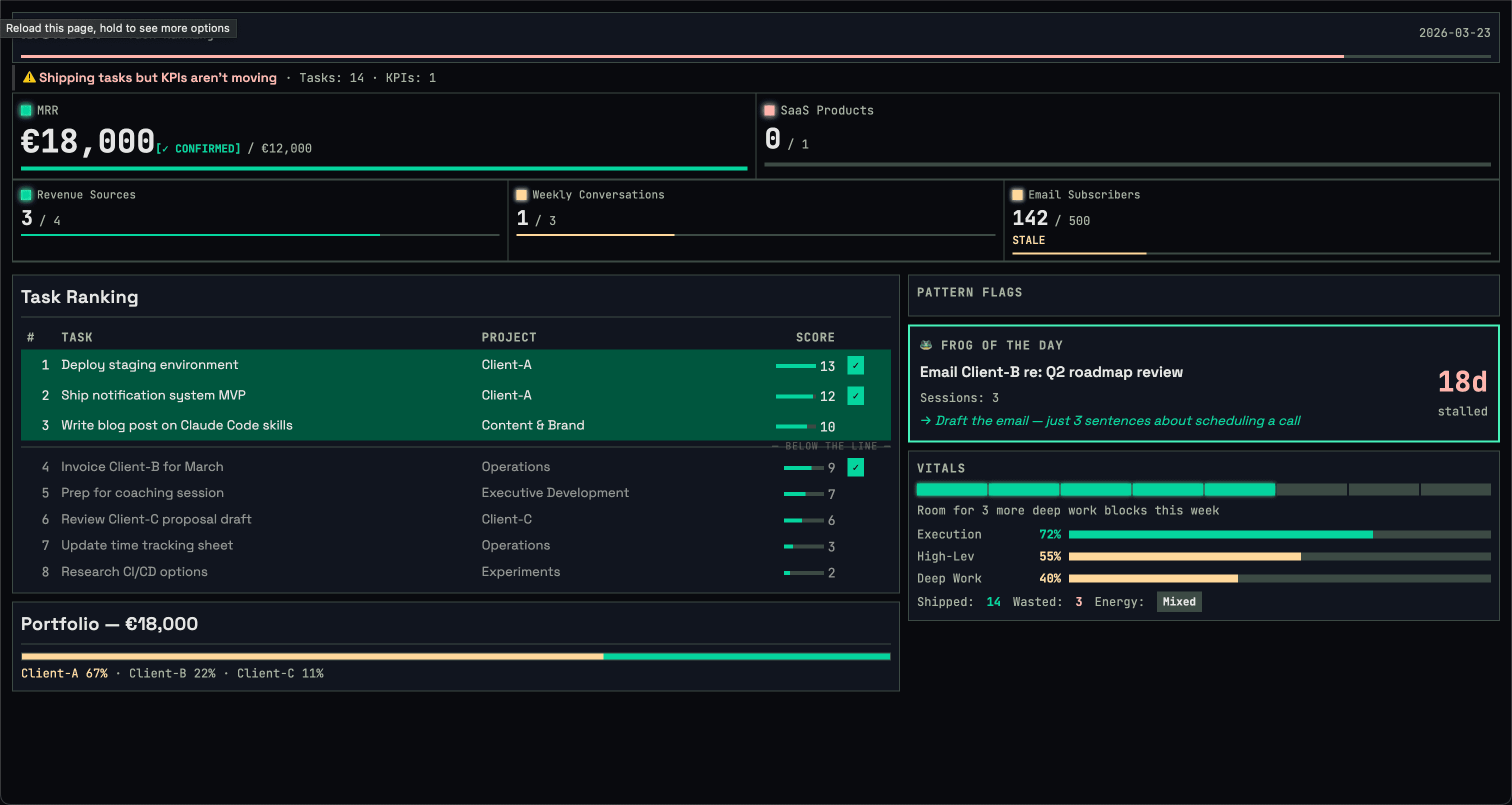
So the mission also launches a live dashboard in the browser. It updates as each phase completes — KPIs appear, then tasks, then scores, then your selections. The terminal stays conversational. The dashboard stays visual.
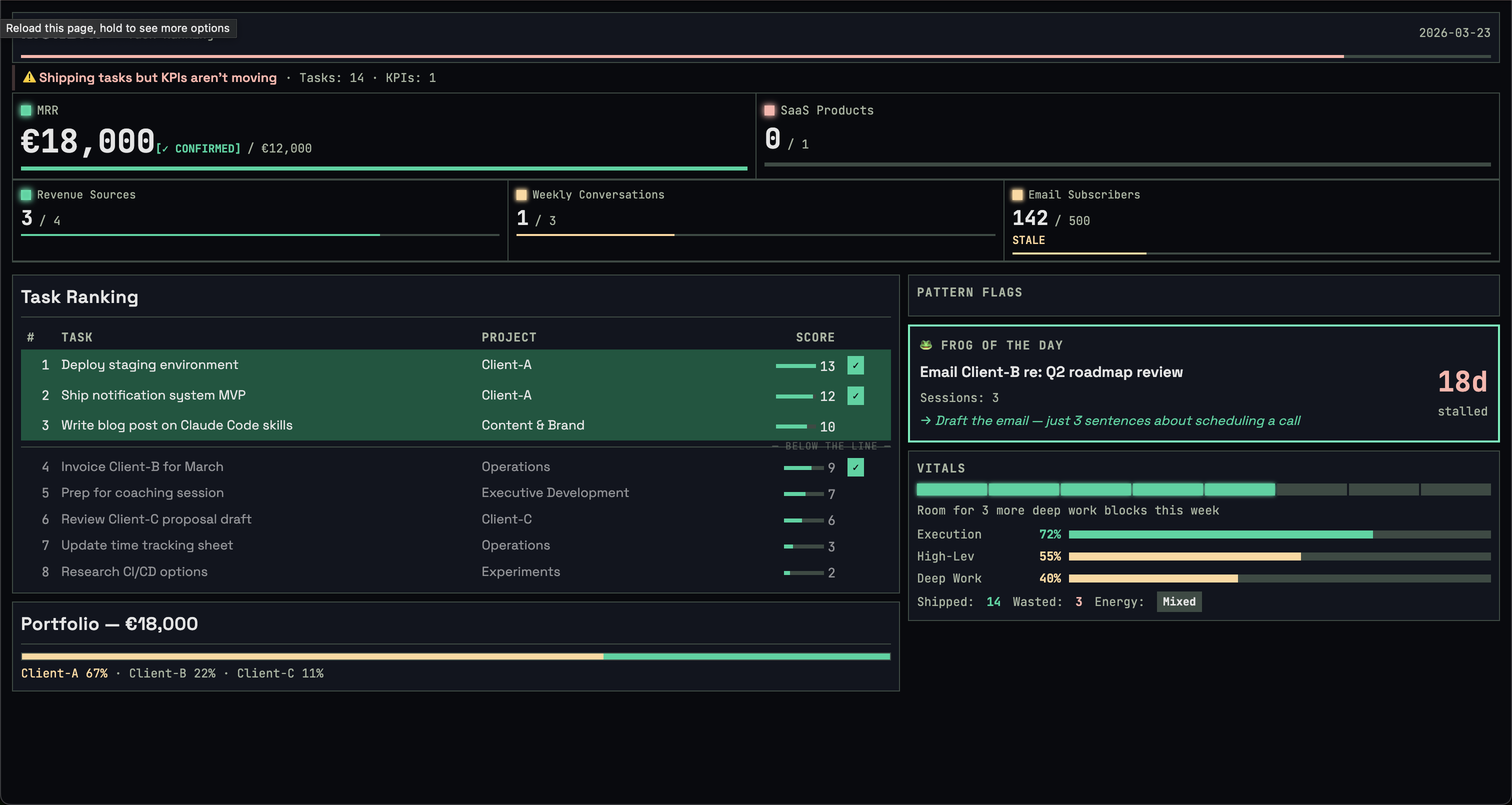
Dark theme, traffic-light KPIs, task ranking with the Pareto 20% highlighted, pattern flags, energy budget, meta-KPI progress bars, and the frog of the day. It's a zero-dependency Node.js server — ~80 lines, no npm install required. At the end of each session, it saves a static HTML snapshot you can reference later.
The Rest of the Team
| Skill | What It Does | When I Use It |
|---|---|---|
/mission | Weekly planning + daily pulse | Every Monday + weekday mornings |
/triage | Surface actionable items from calendar + email | "Anything I'm missing?" |
/coaching-prep | Structured agenda for bi-weekly coaching | Before Merve sessions |
/review-meeting | Transcript -> action items -> tasks -> follow-up | After every call |
/meeting-prep | Build agenda from client history | Before client meetings |
/client-email | Multi-channel comms (email, WhatsApp, Slack) | "Email [client]" or "reply to [client]" |
/screen-lead | Deep research on inbound leads | New lead comes in |
/onboard-client | End-to-end: CRM, contacts, contract, time tracking, project | New client signed |
/ceo-review | Strategic scope challenge before building | Before starting any major implementation |
/screen-lead: Red Flag Detection
When a new lead comes in, I type /screen-lead [name] and the skill runs parallel research: LinkedIn, company registry, web presence, tech signals, Gmail history. It compiles a structured report with green flags and red flags.
The red flags list is built from real experience, not theory:
- AI buzzword overload (if they can't describe what they need without saying "AI-powered" every sentence, they don't know what they need)
- Vague or stock website (no verifiable product, no real team page)
- Title shifting across platforms (LinkedIn says "CEO", website says "Founder", email signature says "Head of Product")
- ASAP + ambitious scope (urgency without budget is a red flag)
- Wants a free prototype before committing
The skill strips all buzzwords in its analysis. "AI-powered marketing mission control" becomes "a dashboard that pulls analytics from multiple ad platforms." It tells me what they actually need, in plain language, then recommends an engagement model: fCTO retainer, web dev retainer, advisory, or pass.
Phase 3 — creating client files, drafting a reply, updating the CRM — only runs after I explicitly confirm interest. The research report stands on its own.
/ceo-review: The Scope Challenge
Before I build anything substantial, I run /ceo-review. It enters strategic advisor mode and asks five nuclear questions:
- What's the 10-star version of this?
- What would you build with zero existing code?
- Who specifically will use this, and what will they stop doing?
- What's the simplest version that would make someone say "holy shit"?
- Is this a feature, a product, or a business?
Then it makes me pick a posture:
| Posture | Meaning |
|---|---|
| SCOPE EXPANSION | "The plan is too small" |
| HOLD SCOPE | "Proceed with maximum rigor" |
| SCOPE REDUCTION | "Here's what to cut" |
The skill is read-only. It never writes code or creates plans. It thinks. Then it hands off to /brainstorm or /plan for implementation. Inspired by Garry Tan's gstack approach to strategic review.
Handoff Chains
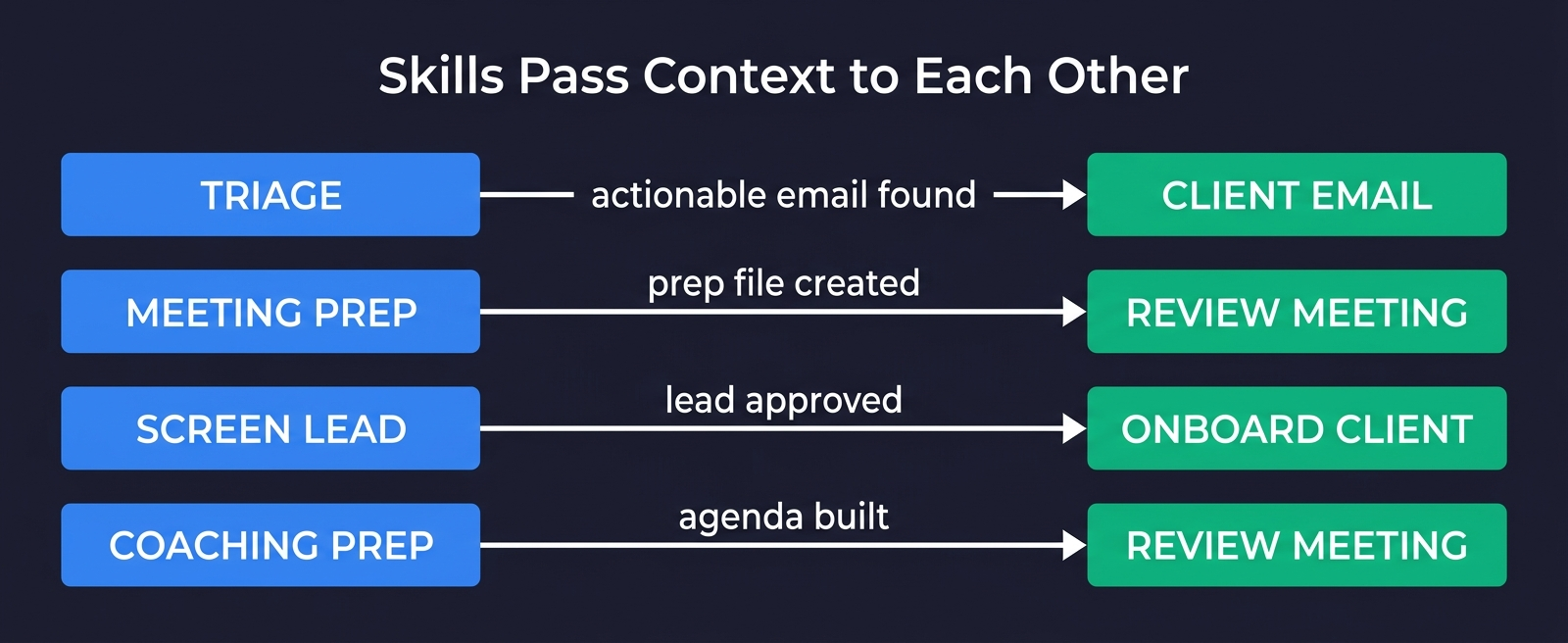
The skills aren't 9 disconnected scripts. They form chains:
/triagesurfaces an actionable email -> suggests "Run/client-email [Client]" with pre-filled context/meeting-prepcreates a Prep Interaction file ->/review-meetingreads it after the call to check what was covered vs skipped/screen-leadvets a lead -> if interested, creates client files that/onboard-clientpicks up/coaching-prepbuilds the agenda ->/review-meeting coachingprocesses the transcript and cross-references what was discussed
Each handoff carries context. The meeting prep skill writes a file. The review meeting skill reads it. No information lost between sessions.
Session Learning
Every skill has a data/feedback.log. When I correct something — "don't show me baseline calendar events" or "always ask for MRR confirmation" — the skill logs it. Next session, it reads the last 20 entries before starting. The same mistake doesn't happen twice.
These aren't conversation memories. They're durable preferences stored as plain text in the skill's data directory. The skill literally starts every session by reading its own correction history.
What Holds It Together
The _shared/conventions.md file is the glue. Every skill reads it on startup. Here's what it enforces:
Three-phase execution. Collect, analyze, interact. No I/O during analysis. This isn't a suggestion — it's a structural constraint that prevents the skill from getting sidetracked.
Local-first search. qmd semantic search across all indexed collections first. Grep and Glob on markdown mirrors second. Live APIs (Gmail, Notion, Granola) only when local data is stale. This makes every skill work offline and keeps API costs near zero.
Notion mirror as filesystem. Read markdown, edit markdown, git commit, auto-sync to Notion via post-commit hooks. The skills never touch the Notion API directly for writes. They edit local files and let the sync engine handle it.
Tables not prose. Dan has ADHD. Scannable tables and bullet points. Structured choices with 2-4 options. Never open-ended questions. This isn't a nice-to-have. It's the difference between a skill I actually use and one I ignore.
Semantic deduplication. Before creating any task, grep for similar titles. Before creating any interaction, check for existing entries with the same client, date, and type. Duplicates are the silent killer of any system backed by a database.
Run logging. Every skill appends to a run log after execution — date, mode, key metrics. Over time, this builds a record of how the system is being used.
What I've Learned
A lot of how these skills are built follows the practices Thariq from Anthropic wrote about in Lessons from Building Claude Code: How We Use Skills. Skills aren't just markdown files — they're folders with scripts, data, gotchas, and references that the agent can explore. The best skills fit cleanly into one category, have progressive disclosure, and focus on what pushes Claude out of its defaults.
Gotchas files are the highest-signal content. Every skill has a gotchas.md built from real failures. The mission gotcha about MRR ("never multiply hourly rate by arbitrary hours"). The screen-lead gotcha about Phase 3 being gated ("never create client files until Dan confirms interest"). The review-meeting gotcha about the prep-to-review handoff. These aren't theoretical — they're things that went wrong and got fixed. They're worth more than the rest of the SKILL.md combined.
Skills that learn from corrections are surprisingly useful. The feedback logs are simple — just timestamped text lines. But they compound. After a few weeks, each skill has a list of 15-20 preferences that make it noticeably better. It's the difference between a tool that needs training every time and one that already knows how you work.
The spear-sharpening check has genuinely changed my behavior. I can't unsee it now. Three tasks shipped, zero KPIs moved? That's not a productive week. That's busywork with extra steps. The check has made me allergic to "supporting" tasks that don't connect to anything measurable.
"Tables not prose" is an ADHD accommodation that makes everything better. Not just for me. Everyone I've shown this system to — ADHD or not — finds the table-based output easier to process. Turns out, forcing structure on information helps humans in general. Who knew.
The biggest value isn't automation. These skills don't run my business. I run my business. They help me think clearly about what matters. The real work was defining the goals, picking the KPIs, connecting tasks to outcomes. The skills just make that chain impossible to ignore. Every Monday, /mission holds up a mirror: here are your goals, here are your KPIs, here's what you actually did, here's what moved. You can't hide from that.
The bottom line: The skills don't run the business — they enforce a chain from strategic goals to measurable KPIs to concrete tasks to daily actions. The goals and KPIs are the system. The skills just make them impossible to ignore. Every Monday, the mission holds up a mirror, and you can't hide from it.
Try It
The whole system is open source.
git clone https://github.com/Danm72/goaly.git
cd goaly
# In Claude Code:
/goaly-setup
/mission
Clone the repo, run the setup wizard (5 questions about your goals and KPIs), and type /mission. No Notion required — it's just markdown files. The sync tools, coaching prep, lead screening, and everything else is in there too.
If this is the kind of operational system you want for your business — goals, KPIs, and AI skills that keep you oriented — that's exactly what I build through Mission Control. It starts with mapping your workflows and ends with a system that knows how you work.
Related posts:Explore the Full Code
Star the repo to stay updated
Let's Connect
Follow for more smart home content
Follow on Twitter/X
x.com/danmalone_mawla
Tags
claude-code
skills
goaly
productivity
ai-agents
notion

Related Articles
Continue reading similar content

I Built Mission Control to Run My Business. Now I'm Building It for Yours.
I built five AI agents to run my business. Everyone who saw it asked the same thing: how do I get this? So I turned Mission Control into a service.
14 min read
Live Notifications in Home Assistant: The YAML That Got 760 Upvotes
How to build Android progress notifications for appliances and doors using smart plugs, power monitoring, and a few lines of YAML. No smart appliances required.
10 min read

How to Build Your Own AI Mission Control with OpenClaw and Telegram
A step-by-step guide to setting up persistent, always-on AI staff in a Telegram forum — four specialized agents with isolated workspaces, inter-agent communication, and scheduled automation using OpenClaw.
18 min read